How to turn stream highlights into Shorts automatically
Short clips bring new viewers to your channel – but scrubbing through a three-hour recording takes longer than the stream. FabStream’s Auto-Cutter finds the moments for you and cuts them in both formats.
During the stream: two quick habits
- Record both formats. Then every highlight already exists in 16:9 and in 9:16 – no reframing later.
- Press the marker hotkey when something good happens, or save a replay clip right away.
After the stream: cut in minutes
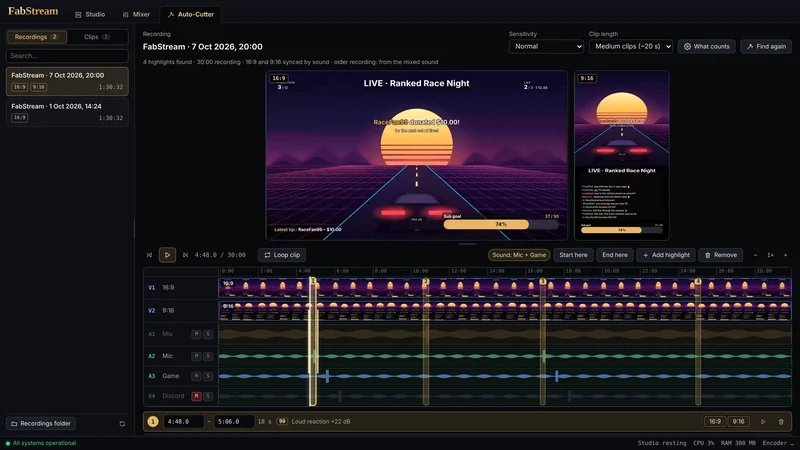
- Open the Auto-Cutter tab. Pick the recording; FabStream analyses it and shows the highlights as markers on the timeline.
- Choose the clip length. From ultra short (5–10 s) for TikTok hooks to longer clips for YouTube.
- Check and adjust. Both previews play in sync. Move or widen a marker, add one you missed, mute the music or a voice on its own track.
- Cut and share. Cut makes every clip in its formats. With Ultra or Max, Share posts them to YouTube Shorts (with schedule) or to your TikTok drafts, with title, description and hashtags.
Frequently asked questions
Which plan includes the Auto-Cutter?
Finding, editing and cutting highlights is part of Premium and up; sharing clips to YouTube Shorts and TikTok from the app is part of Ultra and Max. The free 7-day trial includes everything. Free users still get instant replay clips in both formats.
How does FabStream know what a highlight is?
From several signs: your voice getting loud, chat activity, raids and donations, the markers you set while live, big changes in the picture and – for supported games – game events. You decide per audio source what counts.
Can I edit the clips before I post them?
Yes. The timeline works like a video editor: move or widen highlights, cut and mute parts of single tracks, change the volume per track and undo with Ctrl+Z.
Try it on your next stream
Free for Windows 10/11 – no account, no watermark, no time limit.