Smart layouts
Every source remembers its own position, size and crop per format. Copy a 16:9 layout to 9:16 and adjust only what differs.
FabStream · Smart Streaming Technology
FabStream sends your stream to Twitch and YouTube in 16:9 and to TikTok, Shorts and Reels in 9:16 – simultaneously, from one PC, each with its own layout. Arrange each format once, then just go live.
Free plan: dual output included, no watermark, no time limit. Windows 10/11 (64-bit).
Find us onProduct Hunt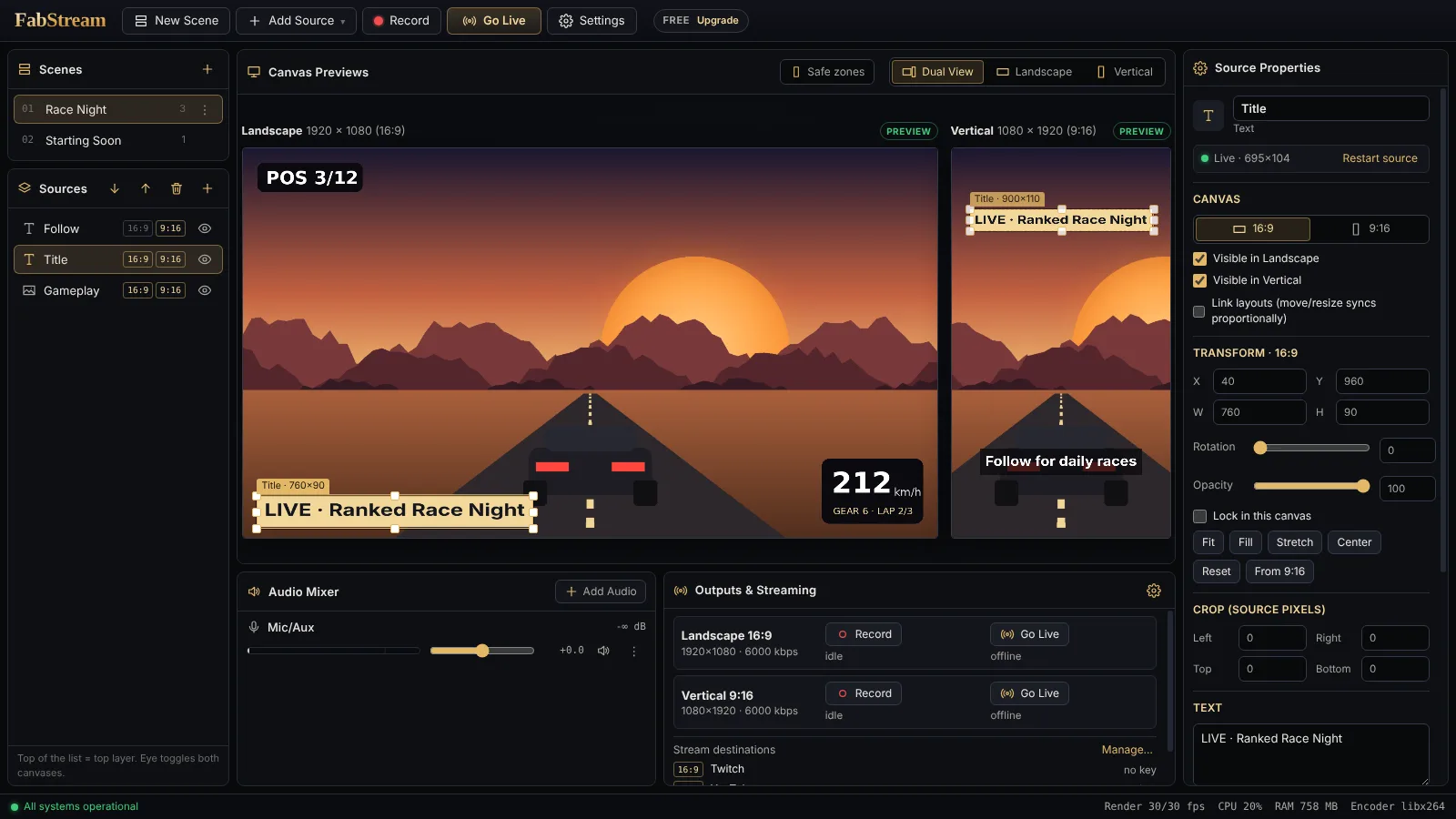
FabStream is a free streaming software for Windows and an alternative to running OBS Studio or Streamlabs twice: one app renders a horizontal and a vertical stream at the same time and multistreams them to Twitch, YouTube, Kick, TikTok LIVE, YouTube Shorts and Instagram. The smart part runs in the background, so you can focus on your show.
Every source remembers its own position, size and crop per format. Copy a 16:9 layout to 9:16 and adjust only what differs.
A real test encode picks the best hardware encoder on your PC – NVIDIA NVENC, AMD AMF or Intel Quick Sync – with x264 as automatic fallback.
If one platform drops, FabStream reconnects it on its own while every other output stays live.
Preview in Max: FabStream spots loud highlight moments in your audio and suggests them as clips – no scrubbing through hours of VOD.
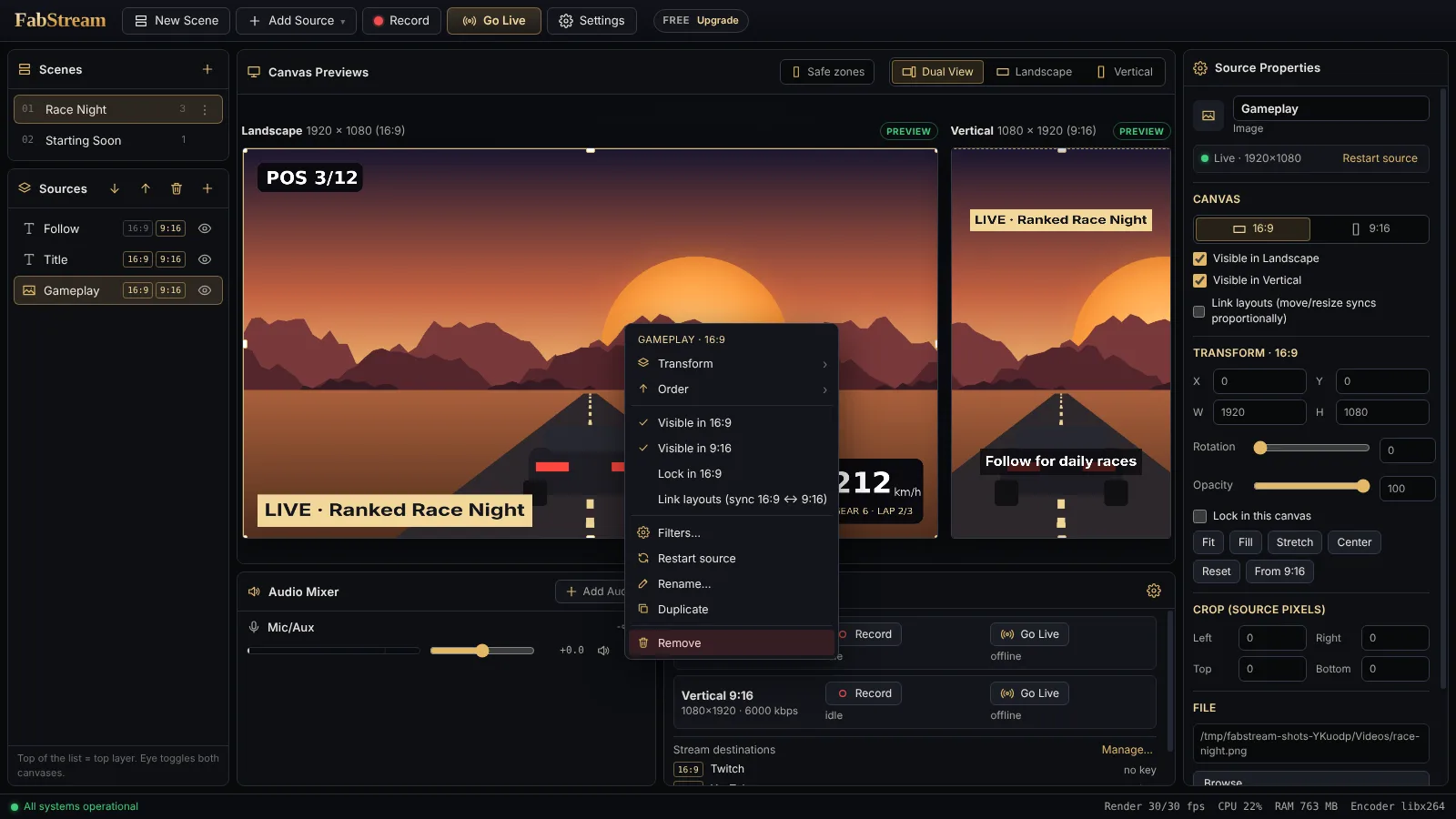
Every source exists once – capture, webcam, overlays, filters. Each format remembers its own position, size, crop and visibility, so the facecam can sit in the corner in 16:9 and fill the bottom half in 9:16.
16:9 and 9:16 live or recorded at the same time – included in the Free plan.
Send each format to several platforms at once – Premium up to 3, Ultra and Max up to 8: Twitch + YouTube + Kick in 16:9, TikTok + Shorts in 9:16.
Premium+One hotkey saves the last moments as a clip in 16:9 and 9:16 at once – instantly, without re-encoding. Free keeps 2 minutes, Premium 5, Ultra 10, Max 30.
Discord, Spotify or your game on their own fader – or left out of the recording completely. Hear any source on your headphones, with or without sending it to the stream.
NVIDIA NVENC, AMD AMF and Intel Quick Sync are detected by a real test encode; x264 is the automatic fallback.
Sources snap to edges, centres and to each other. Right-click anywhere for fit, stretch, flip, rotate, order and filters.
Chroma key, colour correction, blur, sharpen on the GPU. Noise suppression, noise gate, compressor, limiter, 3-band EQ.
See where TikTok, Shorts and Reels put their buttons and captions, so nothing important gets covered.
If a platform drops the connection, FabStream reconnects on its own while the other outputs keep running.
Record both formats in parallel as fragmented MP4, MKV or FLV – while streaming.
Paste the link of your Streamlabs or StreamElements alert box, chat or goal bar – shown transparent, placed separately in 16:9 and 9:16, alert sounds included.
Alert box for follows, subs, gifted subs, raids, bits and donations (StreamElements), chat box, event list, goal bar, timer and “latest donation” labels – drawn by FabStream itself, no widget links needed.
BetaCinematic Podcast, Broadcast Radio, Clear Streamer and more: a complete voice chain in one click – optionally tuned to your voice by an 11-second analysis.
Fade, slide, wipe or your own stinger video – in both formats in the same frame. Prepare the next scene in preview, go live with one click.
Start on Twitch, add YouTube or Kick ten minutes later – or drop one – without interrupting the stream for anyone else.
No account needed, no telemetry. Stream keys are encrypted with Windows DPAPI on your PC and never stored on our servers.
Hardware encoding on every major GPU, streaming over RTMP and RTMPS, crash-safe recording – measured, not promised.
Both formats at 1080p60, 6 outputs on 2 encoders: 60 fps, 0 dropped frames.
AMD Ryzen 7 7800X3D · NVIDIA GeForce RTX 5070 Ti · NVENC · FabStream 1.3.0. 20-second runs per scenario, no game running. Full benchmark · What is still in Beta
Features marked Beta work and you can use them, but we have not published a measurement for them yet. Every finished test is published here with FPS, CPU/GPU load, encoder and dropped frames.
Want to help test? Tell us your CPU, GPU and the game you stream – testers with entry-level PCs are especially welcome. Become a tester
FabStream encodes on your computer and sends each destination directly to the platform. Fabcom Studios is not in that path – no relay server, no copy of your audio or video.
Encrypted with Windows DPAPI and stored only on your PC – never in settings files, never in cloud sync. If you connect Twitch or Kick, our server fetches the key from the platform and passes it to the app without storing it.
The app does not track how you use it. No account is needed for the Free plan.
License checks (paid plans), the optional account and cloud sync, and bug reports you send yourself. The update check asks GitHub and can be switched off. Privacy policy
Try every feature free for 7 days right inside the app – no card needed.
Each format can go to several platforms at once. Premium: up to 3 in 16:9 and 3 in 9:16 – e.g. Twitch, YouTube and Kick horizontally plus TikTok, Shorts and Instagram vertically.
Every destination is sent directly from your PC – no relay in between. Plan about 6 Mbit/s upload per 1080p destination: Free (2 streams) ≈ 12 Mbit/s, 3 + 3 destinations ≈ 36 Mbit/s. Lower the bitrate per format if your connection is slower.
Prices in US$ (English) and € (German) for orientation; the checkout shows the exact amount in your currency. Final prices incl. applicable VAT. Secure checkout by Lemon Squeezy (cards, PayPal, Apple Pay, Google Pay and more). Lemon Squeezy is our authorised reseller and handles payment, invoice and taxes. Subscriptions renew automatically and can be cancelled anytime in your account – your plan stays active until the end of the paid period.
| Feature | Free | Premium | Ultra | Max |
|---|---|---|---|---|
| 16:9 + 9:16 live at the same time | ✓ | ✓ | ✓ | ✓ |
| Platforms per format | 1 | 3 | 8 Beta | 8 Beta |
| Max. output resolution (setting) | 1080p | 1440p Beta | 4K Beta | 4K Beta |
| Max. frame rate (setting) | 60 fps | 120 fps Beta | 240 fps Beta | 240 fps Beta |
| Replay buffer & instant clips | 2 min | 5 min | 10 min | 30 min |
| Parallel recording, application audio, filters | ✓ | ✓ | ✓ | ✓ |
| NVENC / AMF / Quick Sync | ✓ | ✓ | ✓ | ✓ |
| Watermark / time limit | none | none | none | none |
| PCs per license | – | 1 | 3 | 5 |
| Early access to preview features | – | – | – | ✓ |
| Support | community | priority | ||
| Price per month | $0 | $7.99 | $14.99 | $24.99 |
Resolution and frame rate are the highest settings a plan unlocks – not a performance promise. What your PC sustains depends on its GPU, encoder and the game you play. Values marked Beta work but are still being tested – see measured vs. Beta.
FabStream – Smart Streaming Technology – is a streaming studio for Windows by Fabcom Studios. It sends one scene to two outputs at once: 16:9 for Twitch, YouTube and Kick and 9:16 for TikTok, YouTube Shorts and Instagram – each with its own layout, from one PC.
Yes – that is what FabStream is built for. One scene, two programs: 16:9 (e.g. 1920×1080) and 9:16 (e.g. 1080×1920) go live or get recorded in parallel. This is included in the Free plan.
Yes. You get what you know from desktop streaming apps – scenes, sources, filters, recording, hardware encoding – but FabStream is designed around two canvases from the start, so you do not need a second app instance or plugins for vertical streams. The Free plan needs no account and adds no watermark.
Yes. Dual output (16:9 + 9:16) up to 1080p60, recording, replay clips, application audio, filters and hardware encoding are free with no watermark and no time limit. Premium, Ultra and Max add multistream (3 or 8 platforms per format), higher output settings (up to 1440p120 or 4K240 – what your PC sustains depends on its hardware), longer replay buffers and more PCs.
Premium if you stream each format to two or three platforms in 1080p/1440p. Ultra if you need up to 8 platforms per format, up to 3 PCs, or 4K / high frame rates on a PC that can handle them. Max for long sessions (30-minute replay buffer), up to 5 PCs and early access to new features. You can switch plans anytime on the account page.
Every platform that gives you an RTMP or RTMPS server and stream key: Twitch, YouTube, Kick, Facebook, TikTok LIVE (if your account has stream-key access), Instagram Live (stream key from Live Producer) and custom servers.
Windows 10 or 11 (64-bit) and a GPU with a hardware encoder (NVIDIA NVENC, AMD AMF or Intel Quick Sync); without one, FabStream uses x264 on the CPU. Entry-level cards such as a GTX 1650 can run both formats, but with a game open they are close to their limit – start there with 16:9 at 1080p60 and 9:16 at 720p or 30 fps, and raise it if the stats show no dropped frames.
We only call measured what we have measured. So far: both formats at 1080p60 with stream, recording and replay buffer on a Ryzen 7 7800X3D with an RTX 5070 Ti – 0 dropped frames (20-second runs per scenario, no game running). Entry-level hardware (4 cores + GTX 1650 class) with a game running and 60-minute sessions are in Beta: the tests are running and will be published with FPS, CPU/GPU load, encoder and dropped frames. See measured vs. Beta.
FabStream sends each destination directly from your PC – no relay server in between, so no extra delay and no third party sees your stream. Plan about 6 Mbit/s upload per 1080p destination (e.g. Twitch + YouTube + TikTok ≈ 18 Mbit/s); lower the bitrate per format in Settings if needed.
After checkout you get a key (FSK-…) on screen and by e-mail. Paste it in FabStream → Plan & License. One subscription works on 1 (Premium), 3 (Ultra) or 5 (Max) PCs; you can move it anytime. Your plan keeps working offline for up to 7 days.
Yes – invite other streamers. Every FabStream account has a referral link; you get 20 % of every subscription started through it, every month it is paid. Your account shows what that makes this month and which plan it pays for. How it works.
On the account page: sign in (or enter your key), open “Invoices & billing” and cancel. Your plan stays active until the end of the period you paid for.
New apps without an established reputation trigger SmartScreen. Click “More info” → “Run anyway”. Download FabStream only from this website.