How to stream in 16:9 and 9:16 at the same time
Horizontal viewers watch on Twitch, YouTube and Kick, vertical viewers scroll TikTok, YouTube Shorts and Instagram. FabStream gives every scene a 16:9 and a 9:16 picture at the same time, so you reach both without a second PC, a second program or an add-on.
How it works
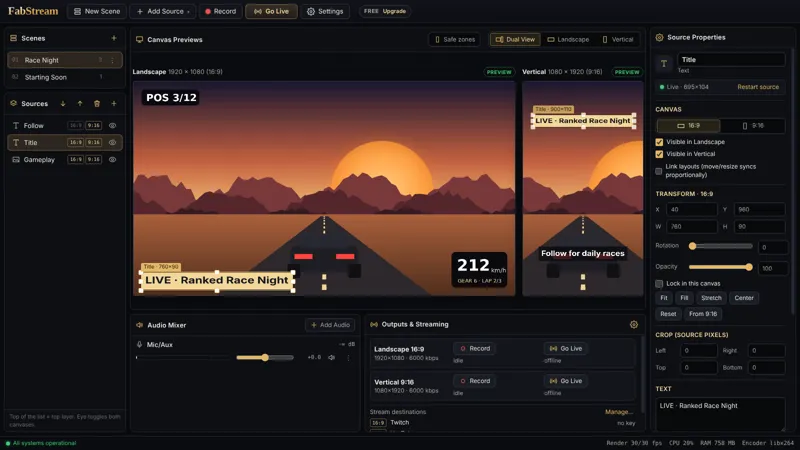
Every scene in FabStream has two canvases: 1920×1080 for 16:9 and 1080×1920 for 9:16. The sources – game, camera, alerts, chat – are the same; only their position, size and crop differ per canvas. Each canvas is its own program with its own platforms, recording and replay buffer.
Step by step
- Install and run the assistant. Download FabStream free. On first start the assistant measures your PC and your upload and sets both formats to the best quality they deliver.
- Add your sources once. Game Capture, display or window, camera, images, browser sources and the built-in widgets appear in both previews.
- Arrange the 9:16 picture. A typical vertical layout: camera at the top, the game cropped to its centre below, alerts in the middle. Hold Alt while dragging a handle to crop.
- Add a platform to each format. Settings → Stream → Add platform: for example Twitch for 16:9 and TikTok LIVE for 9:16. FabStream opens the key page and picks up the copied server and key.
- Go live. One click starts both formats. Turn on recording too and you get a 16:9 and a 9:16 file for later edits.
What you need
- Windows 10 or 11 (64-bit); ideally a graphics card with NVIDIA NVENC, AMD AMF or Intel Quick Sync – without one FabStream uses x264 on the CPU.
- About 6 Mbit/s upload per platform at 1080p – about 12 Mbit/s for one platform per format.
Frequently asked questions
Is streaming in 16:9 and 9:16 at the same time free?
Yes. The Free plan includes both formats at once up to 1080p at 60 fps, with recording and replay clips – no account, no watermark and no time limit.
Does a second format double the load on my PC?
No. FabStream draws the scene once and encodes each format once on your graphics card; that encode is shared by every platform, the recording and the replay buffer. Measured on a Ryzen 7 7800X3D with an RTX 5070 Ti: both formats at 1080p60 with stream, recording and replay buffer at a steady 60 fps and 0 dropped frames.
Can I only record both formats without going live?
Yes. Recording works on its own: FabStream saves a 16:9 and a 9:16 file side by side, sorted into the folders Horizontal and Vertical.
Do I have to arrange every source twice?
Only where you want a different layout. Right-click a source to copy its position from the other format, or link the layouts so a change applies to both.
Try it on your next stream
Free for Windows 10/11 – no account, no watermark, no time limit.