Smart layouts
Every source remembers its own position, size and crop per format. Copy a 16:9 layout to 9:16 and adjust only what differs.
FabStream · Smart Streaming Technology
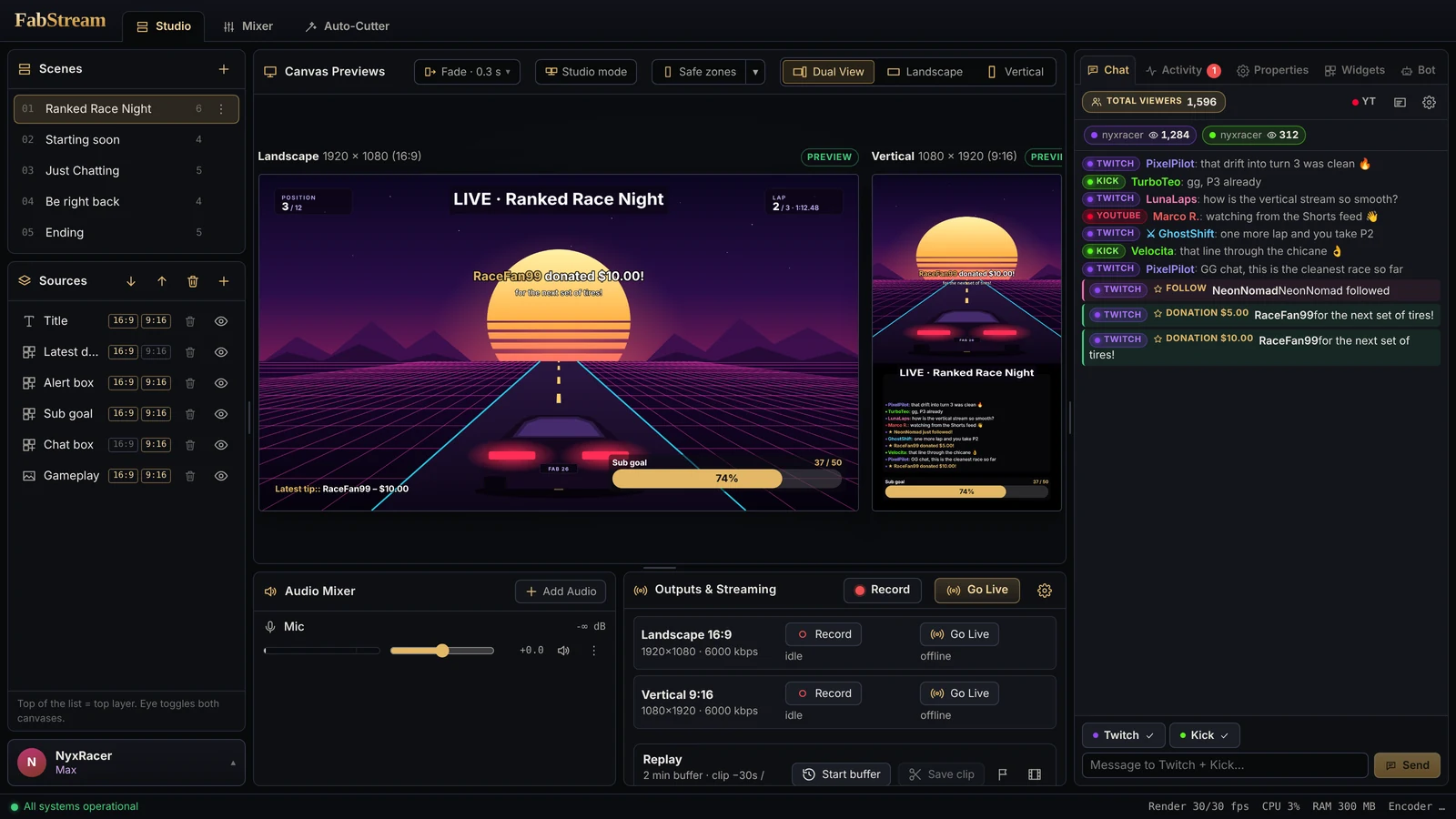
The streaming studio built for horizontal and vertical at the same time: Twitch, YouTube and Kick in 16:9, TikTok, Shorts and Reels in 9:16 – from one PC, each with its own layout, with alerts, chat and widgets built in.
Go live on
FabStream is free streaming software for Windows and the alternative to running two streaming programs at once: one app renders a horizontal and a vertical stream at the same time and multistreams them to Twitch, YouTube, Kick, TikTok LIVE, YouTube Shorts and Instagram. The smart part runs in the background, so you can focus on your show.
Every source remembers its own position, size and crop per format. Copy a 16:9 layout to 9:16 and adjust only what differs.
A real test encode picks the best hardware encoder on your PC – NVIDIA NVENC, AMD AMF or Intel Quick Sync – with x264 as automatic fallback.
If one platform drops, FabStream reconnects it on its own while every other output stays live.
The assistant measures your PC and your upload and sets both formats to what they deliver – in one click.
Every source exists once – capture, webcam, overlays, filters. Each format remembers its own position, size, crop and visibility, so the facecam can sit in the corner in 16:9 and fill the bottom half in 9:16.
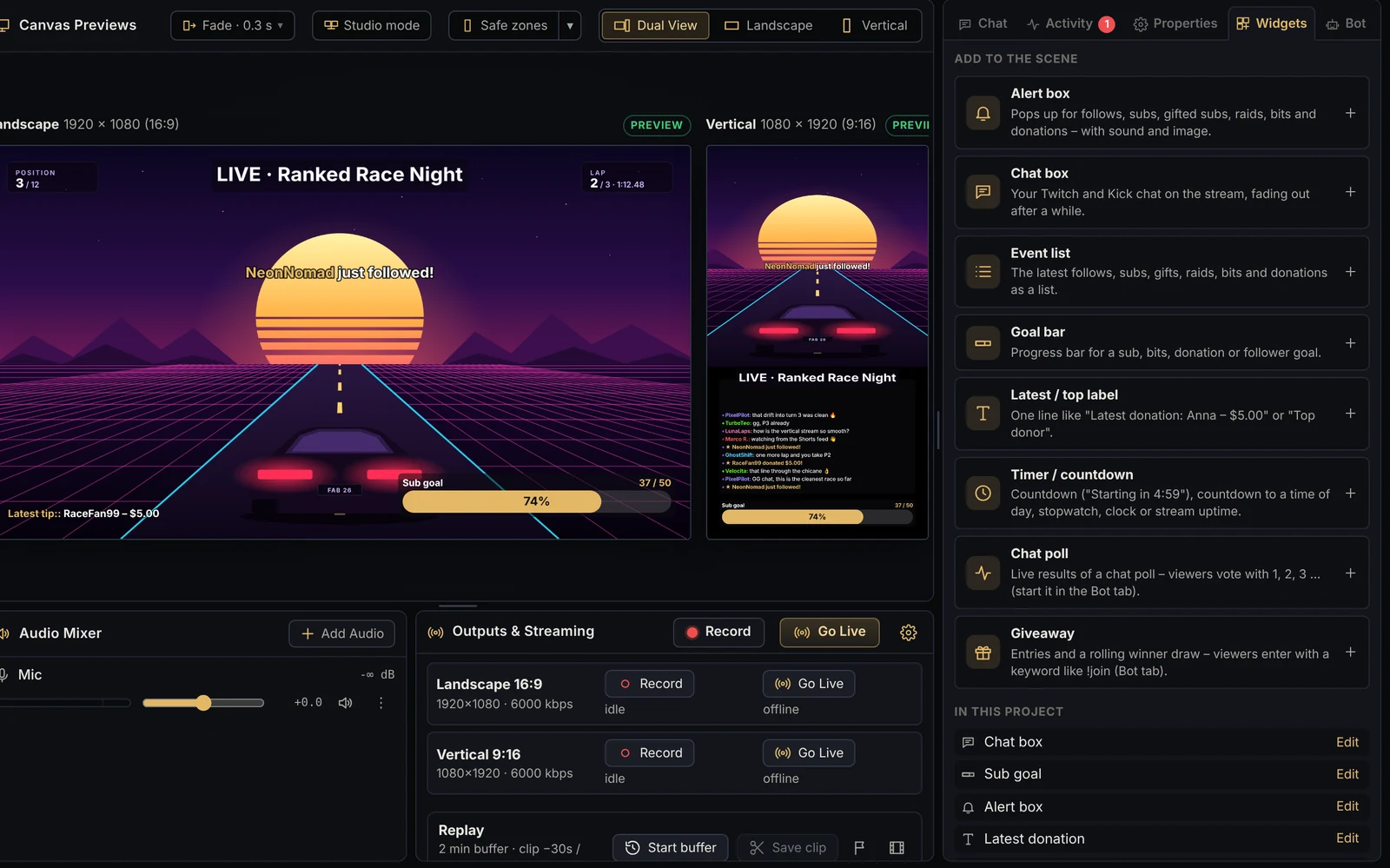
Alert box, chat box, event list, goal bar, labels, timer, polls and giveaways – drawn by FabStream itself, placed separately in 16:9 and 9:16. No widget links, no browser tabs.
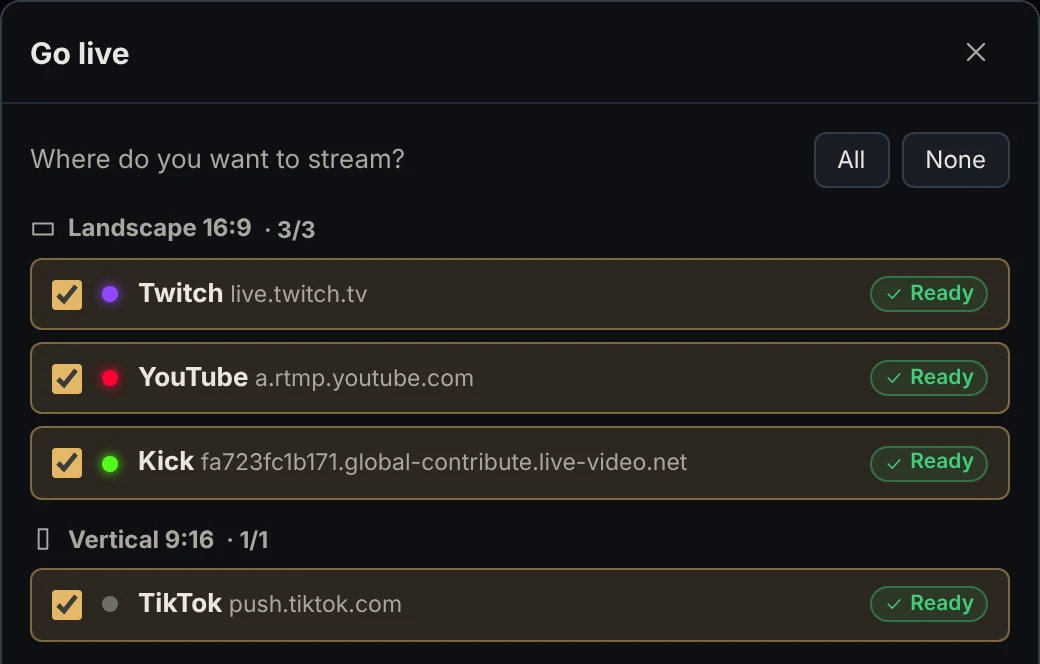
Choose where you go live and FabStream sends each format to all of them at once – directly from your PC, without a relay server in between.
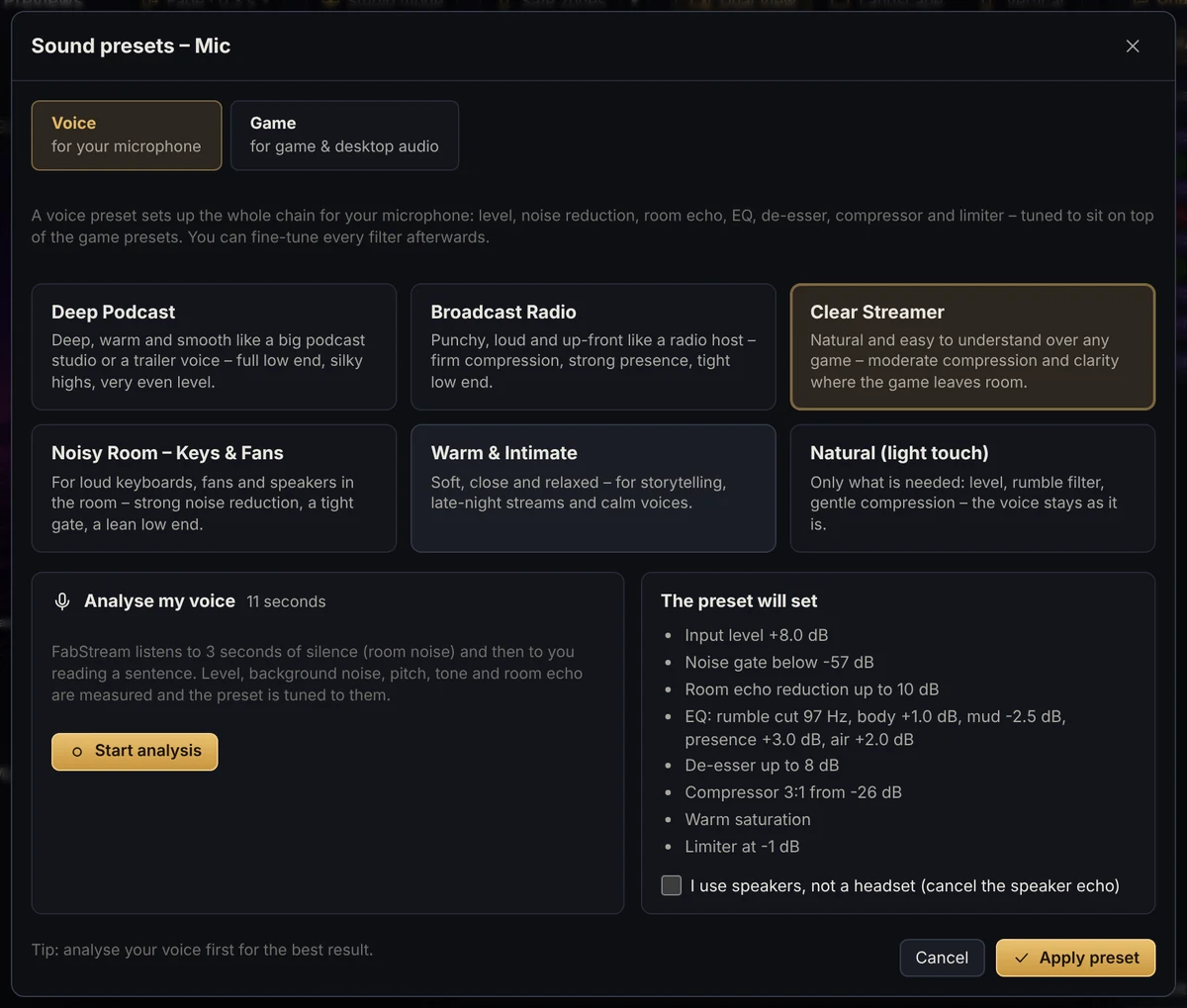
Voice presets build a complete chain for your microphone – level, noise reduction, room echo, EQ, de-esser, compressor and limiter. An 11-second analysis tunes it to your voice and your room.
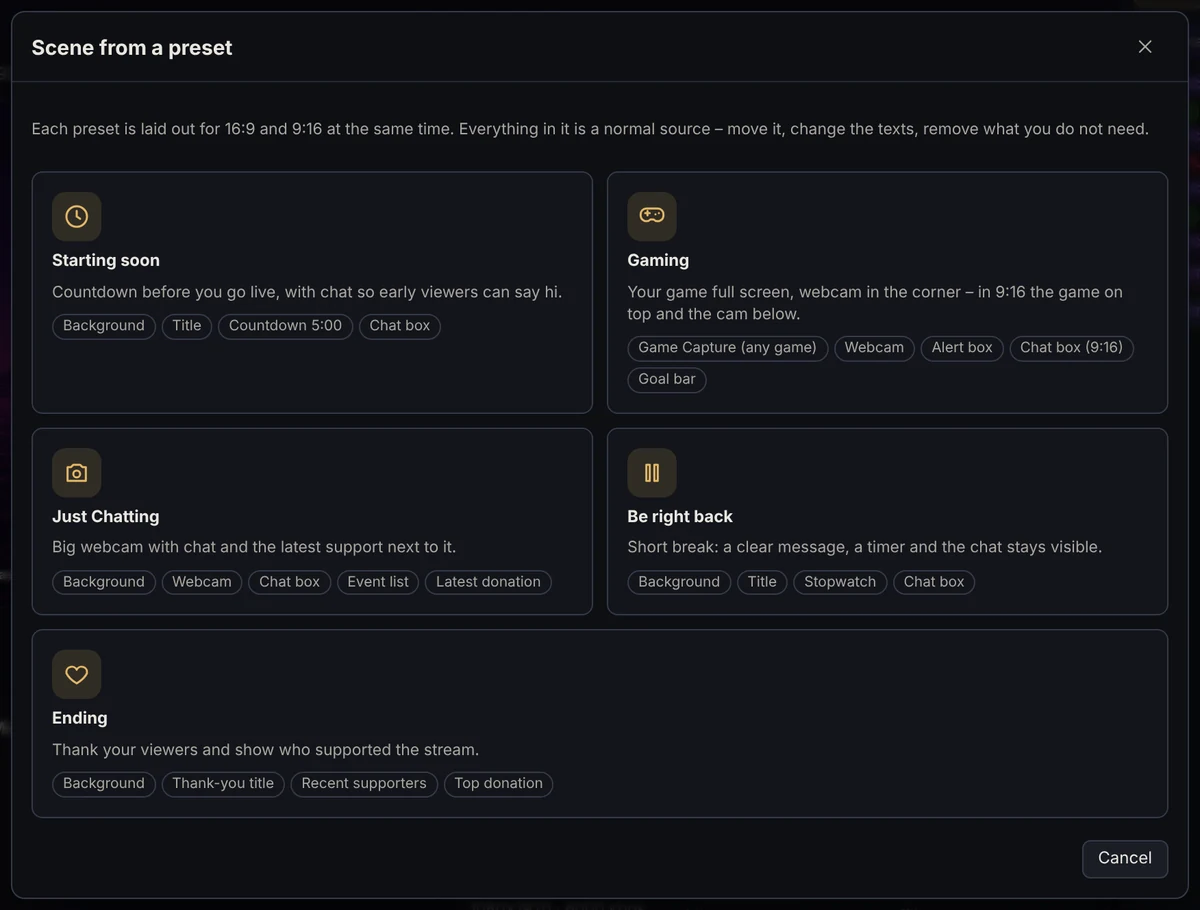
Starting soon, Gaming, Just Chatting, Be right back and Ending – each laid out for 16:9 and 9:16 at once, with the right widgets already in place.
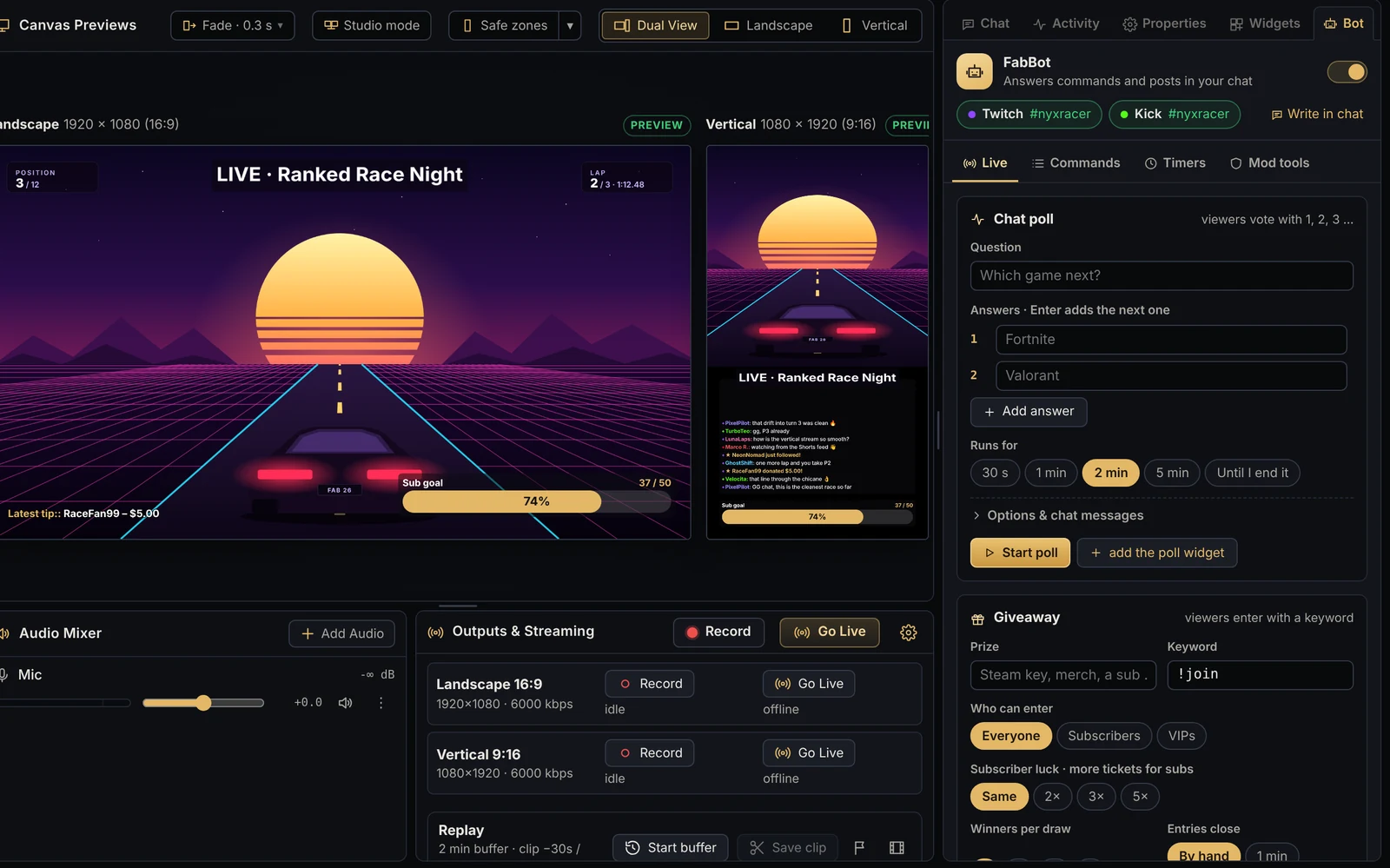
Polls, giveaways, commands, timed messages and mod tools for Twitch and Kick – right next to your scenes, with live results as on-stream widgets.
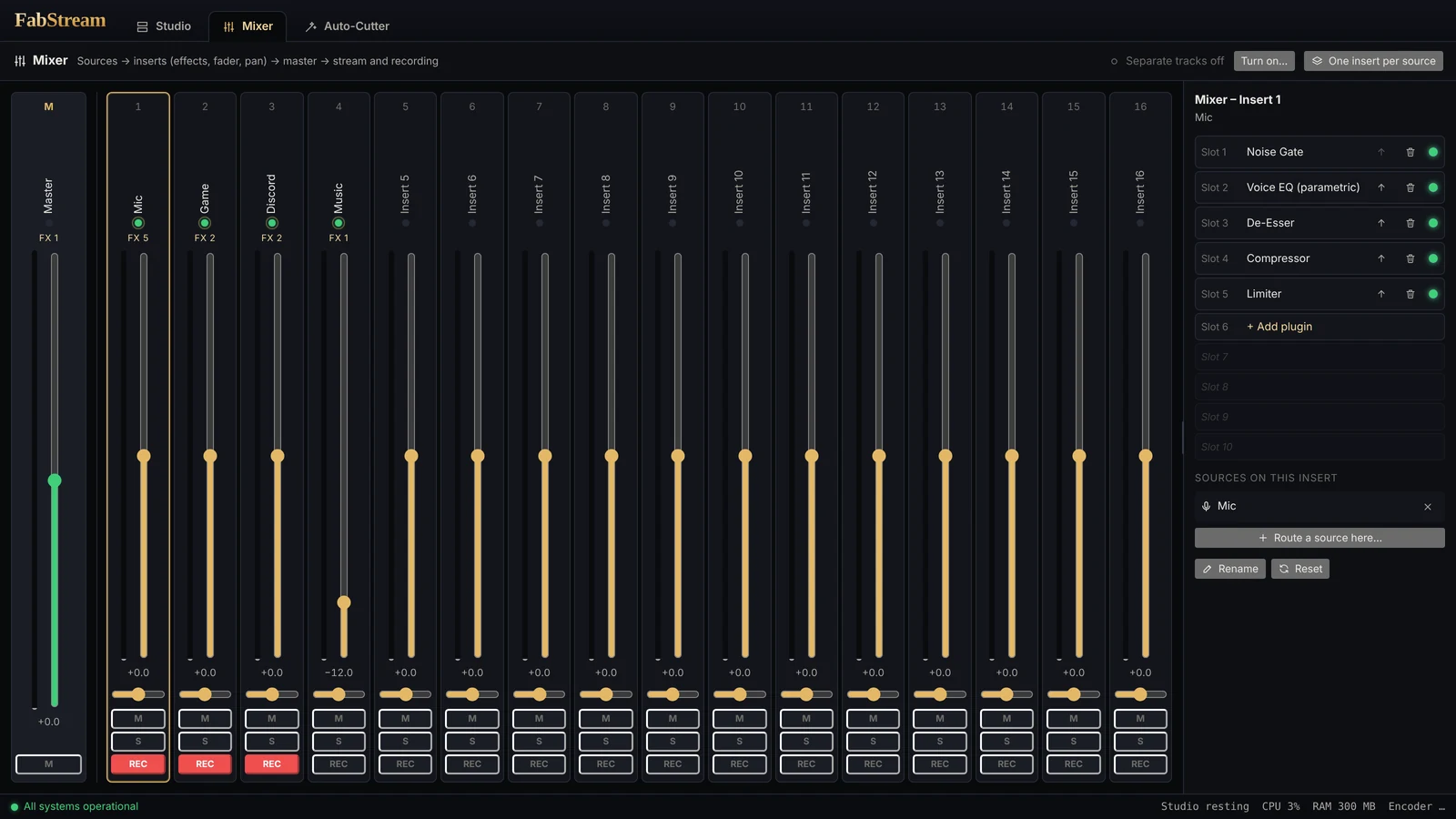
Master plus 16 inserts, like in a music studio: put your mic, game, Discord and music on their own channel, load effects into the plugin slots and mix with fader, pan, mute and solo – in sync with the audio mixer in the Studio.
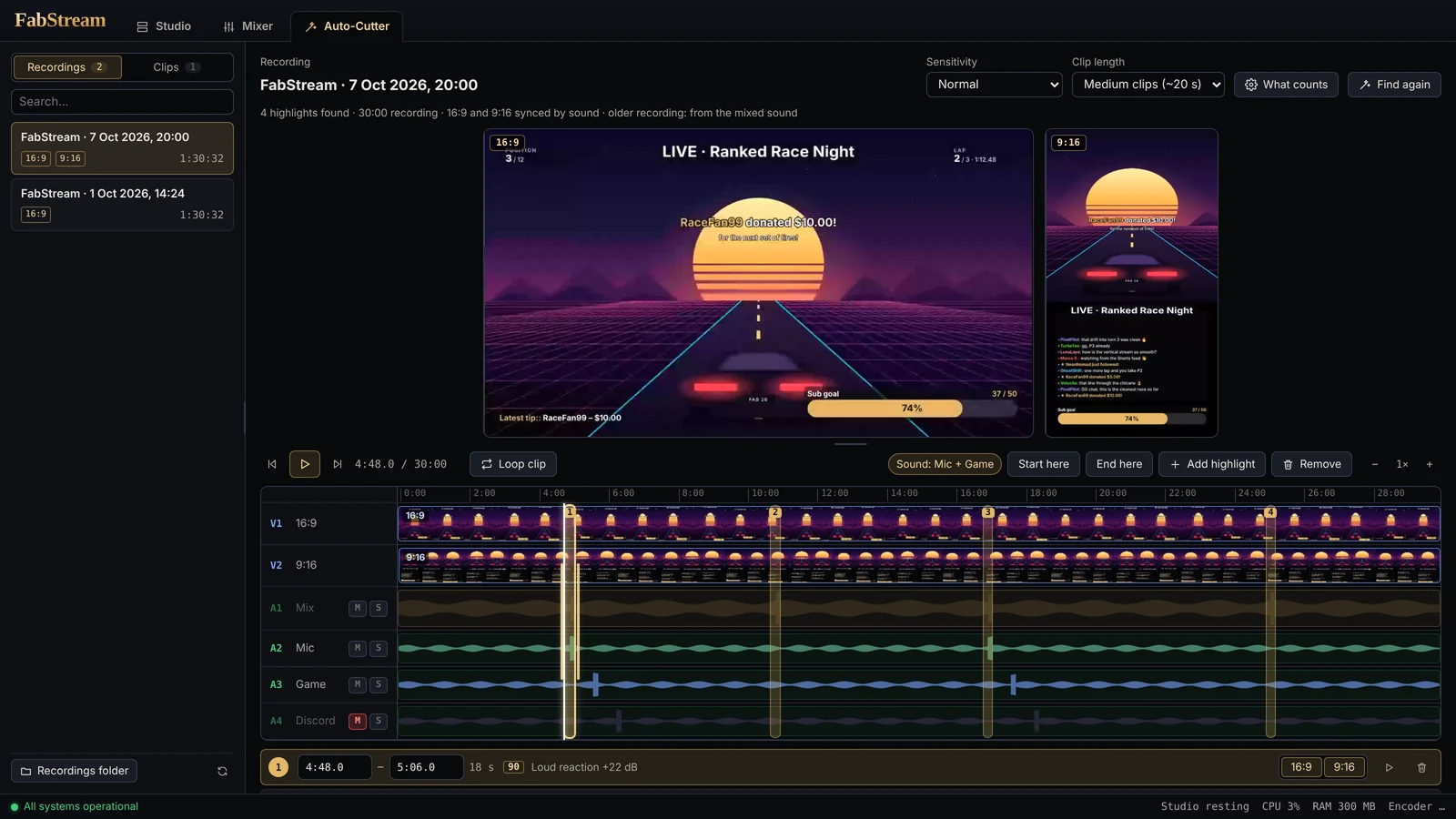
FabStream finds the best moments of your recording and lays them out like a video editor: 16:9 and 9:16 on their own video tracks, the mix and every separate audio track below.
16:9 and 9:16 live or recorded at the same time – included in the Free plan.
One hotkey saves the last moments as a clip in 16:9 and 9:16 at once – instantly, without re-encoding. Free keeps 2 minutes, Premium 5, Ultra 10, Max 30.
NVIDIA NVENC, AMD AMF and Intel Quick Sync are detected by a real test encode; x264 is the automatic fallback.
Sources snap to edges, centres and to each other. Right-click anywhere for fit, stretch, flip, rotate, order and filters.
Chroma key, colour correction, blur, sharpen on the GPU. Noise suppression, noise gate, compressor, limiter, 3-band EQ.
See where TikTok, Shorts and Reels put their buttons and captions, so nothing important gets covered.
Record both formats in parallel as fragmented MP4, MKV or FLV – while streaming.
FabStream finds the highlights of your recording and shows them under a 16:9 and a 9:16 preview. Adjust them, cut every clip in both formats with one click and share them to YouTube Shorts and TikTok.
A mixer tab with master and 16 inserts: effect slots, fader, pan, mute and solo per insert. Press REC and your recording gets the mix plus up to 5 separate tracks – voice, game, Discord – ready for Premiere, DaVinci Resolve or CapCut.
BeamNG.drive tells FabStream about crashes, rollovers, big jumps and top-speed runs while you record – the Auto-Cutter turns them into highlights with the speed in the title.
In the Auto-Cutter every audio track has M and S, like in a video editor: Discord out, voice and game in – the preview plays it and every clip is cut with exactly that sound.
Upload your clips as Shorts with category, audience, language, playlist and the AI label – or schedule them: the first at 6 pm, then one every 3 hours.
Drag the edges of every panel – in the Studio, the Mixer and the Auto-Cutter. FabStream remembers the sizes.
Stream Deck, Touch Portal, Streamer.bot, Loupedeck and Companion work right away – scenes, go live, record, mute, clips, each format on its own button. Or use your phone in the same Wi-Fi as a remote: live picture, chat, FabBot polls and giveaways, every source per format – swipe between the pages.
Any web overlay – shown transparent, placed separately in 16:9 and 9:16, with its sound in the mixer.
Moderate your Twitch and Kick channels – or any channel you are a mod of, both at the same time – right from FabStream: one live chat with delete, timeout and ban on every line, user cards, warnings, slow / followers / emote-only, shield mode and announcements. Twitch commands like /timeout work too. Part of Ultra and Max.
Optional: your scenes and settings follow you to every PC with your FabStream account. Stream keys stay local.
No account needed for Free, no usage tracking. Stream keys are encrypted with Windows DPAPI on your PC and never stored on our servers.
Hardware encoding on every major GPU, streaming over RTMP and RTMPS, crash-safe recording – measured, not promised.
Both formats at 1080p60, 6 outputs on 2 encoders: 60 fps, 0 dropped frames.
AMD Ryzen 7 7800X3D · NVIDIA GeForce RTX 5070 Ti · NVENC · FabStream 1.3.0 · stream, recording and replay buffer in both formats. Full benchmark
FabStream encodes on your computer and sends each destination directly to the platform. Fabcom Studios is not in that path – no relay server, no copy of your audio or video.
Encrypted with Windows DPAPI and stored only on your PC – never in settings files, never in cloud sync. If you connect Twitch or Kick, our server fetches the key from the platform and passes it to the app without storing it.
The app does not report how you use it – no usage data, no analytics. No account is needed for the Free plan.
The license check of paid plans (about every 12 hours), a one-time anonymous count of new installations, the optional account and cloud sync, and bug reports you send yourself. The update check asks GitHub and can be switched off. Privacy policy
FabStream – Smart Streaming Technology – is a streaming studio for Windows by Fabcom Studios. It sends one scene to two outputs at once: 16:9 for Twitch, YouTube and Kick and 9:16 for TikTok, YouTube Shorts and Instagram – each with its own layout, from one PC.
Yes – that is what FabStream is built for. One scene, two programs: 16:9 (e.g. 1920×1080) and 9:16 (e.g. 1080×1920) go live or get recorded in parallel. This is included in the Free plan.
Yes. You get what you know from desktop streaming apps – scenes, sources, filters, recording, hardware encoding – but FabStream is designed around two canvases from the start, so you do not need a second app instance or plugins for vertical streams. The Free plan needs no account and adds no watermark.
Yes – and without an account. Dual output (16:9 + 9:16) up to 1080p60, recording, replay clips, application audio, filters and hardware encoding are free with no watermark and no time limit. Premium, Ultra and Max add multistream (2, 4 or 8 platforms per format), higher output settings (1080p120, 1440p240 or 4K240 – what your PC sustains depends on its hardware), the Mixer with separate audio tracks, remote control, the Auto-Cutter, longer replay buffers and more PCs. Want to try them? Create a free account and test everything for 7 days – no credit card.
Premium if you stream each format to two platforms in 1080p (up to 120 fps) and want the Mixer, remote control and the Auto-Cutter. Ultra if you need up to 4 platforms per format, 1440p at up to 240 fps, clip sharing or up to 3 PCs. Max for 8 platforms per format, 4K, long sessions (30-minute replay buffer), unlimited PCs and early access to new features. You can switch plans anytime on the account page.
Every platform that gives you an RTMP or RTMPS server and stream key: Twitch, YouTube, Kick, Facebook, TikTok LIVE (if your account has stream-key access), Instagram Live (stream key from Live Producer) and custom servers.
Windows 10 or 11 (64-bit) and ideally a GPU with a hardware encoder – NVIDIA NVENC, AMD AMF or Intel Quick Sync; FabStream finds the best one on your PC by itself and falls back to x264 on the CPU. After the install, Settings → Assistant measures your PC and your upload and sets both formats to the best quality they deliver.
FabStream encodes each format once and shares that encode with every destination, the recording and the replay buffer. Measured on a Ryzen 7 7800X3D with an RTX 5070 Ti: both formats at 1080p60 with stream, recording and replay buffer – 6 outputs on 2 encoders, a steady 60 fps and 0 dropped frames.
FabStream sends each destination directly from your PC – no relay server in between, so no extra delay and no third party sees your stream. Plan about 6 Mbit/s upload per 1080p destination (e.g. Twitch + YouTube + TikTok ≈ 18 Mbit/s). The assistant in the app measures your upload and sets the bitrate for you. Coming soon: an optional Cloud Relay for a small upload – your PC sends each format once and our server in Europe forwards it to every platform (included in Max, add-on for Premium and Ultra).
After checkout you get a key (FSK-…) on screen and by e-mail. Paste it in FabStream → Plan & License. One subscription works on 1 (Premium), 3 (Ultra) or any number of (Max) PCs; you can move it anytime. Your plan keeps working offline for up to 7 days.
Yes – invite other streamers. Every FabStream account has a referral link; you get 20 % of every subscription started through it, every month it is paid. Your account shows what that makes this month and which plan it pays for. How it works.
On the account page: sign in (or enter your key), open “Invoices & billing” and cancel. Your plan stays active until the end of the period you paid for.
Download FabStream, pick a scene preset and press Go Live – horizontal and vertical at once.